
Efficient Image Embedding in TinyGo
When developing the 3310 engine for Trick Shot II, I needed an efficient way to represent sprites.
The key parameters were:
- Minimize flash (the RP2040 is limited to 2MB)
- Support monochrome
- Support transparency
- Minimal processing needed
I designed the 3310 engine Canvas interface to draw to screen with a simple Set method:
type Canvas interface {
  //...
	Set(x, y int, val bool)
	//...
}
I wanted to avoid png and gif images in the binary because:
- There were only three states of color I cared about,
on,off,transparent - RAM is limited on microprocessors, and processed images require a bunch of RAM
- Preferably we read images directly from ROM
Netpbm
I came across Netpbm when investigating various image formats. There are three different formats of interest:
pbm- portable bitmap - monochromepgm- portable graymap - grayscaleppm- portable pixmap - supports indexed color
A key difference between pgm and ppm (other than the support for non-grayscale colors) is that ppm must define the color for each index, but pgm just places levels of gray on a scale.
There are two variants for these formats Ascii (human readable) and Binary.
Netpbm Image Formats
I ended up using both pbm and pgm to represent images.
The advatages are:
- Can embed on ROM without taking too much space
- It is easy to read pixels directly off ROM (no RAM overhead)
- I can preview the images in my workspace - because they are a known image format
Portable BitMap Format
The binary format of pbm looks like:
P4
16 16
<binary blob 32-bytes>
The first line is the format P4 - which specifically is for the binary variant of portable bitmap.
The second line is the dimension of the bitmap 16 wide and 16 tall.
The binary blob represents the actual pixels. Each byte represents 8 pixels in a row, so the blob is 32-bytes in size:
\[\begin{aligned} size &= \left \lceil{ \frac{width}{8}} \right \rceil \times height \\ &= \left \lceil{ \frac{16}{8}} \right \rceil \times 16 = 32 \\ \end{aligned}\]Note, we are taking the ceiling of width/8. So if our width is not divisible by 8, our rows get padding bits. This simplifies traversing the bitmap.
For example, if we had a 12 wide 16 tall image:
\[\begin{aligned} size &= \left \lceil{ \frac{width}{8}} \right \rceil \times height \\ &= \left \lceil{ \frac{12}{8}} \right \rceil \times 16 = 2 \times 16 = 32\\ \end{aligned}\]Portable GrayMap Format
I also used the pgm format. I used this to allow the original art to have grayscale features, but apply dithering to emulate different shades.
You can see this effect below, on the left is the grayscale title image loaded in aseprite, and on the right is the title rendered in the game.
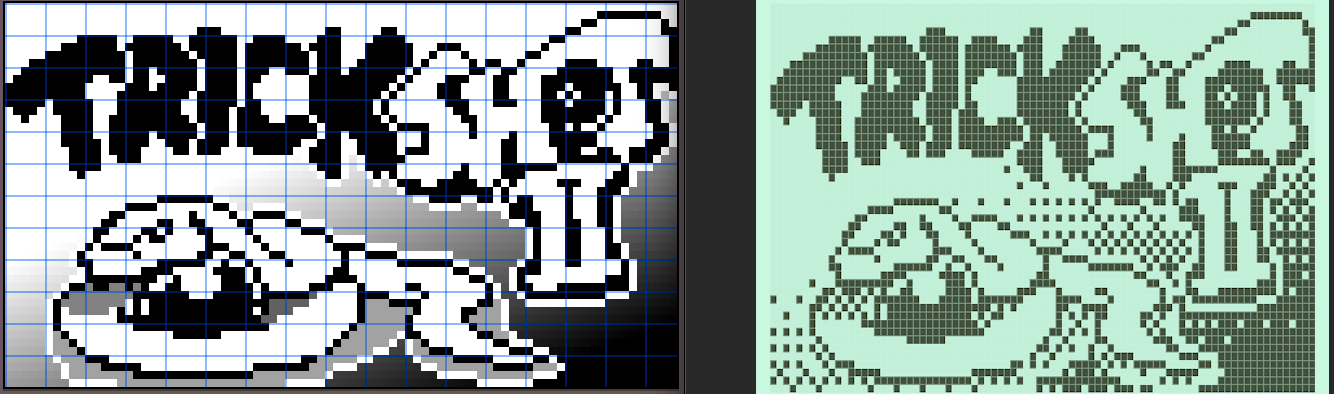
The pgm format looks like:
P5
16 16
255
<binary blob 256-bytes>
This time, each byte represents exactly one pixel, so the size of the binary blob is trivial.
Converting Images
I wrote a generator which converts PNGs into one of three formats:
pbmthis is a pure black/white imagepgmthis is a grayscale image, but with only 64-levels of gray,0xFFis reserved as transparent, the 64 levels of gray are used to apply dithering over and 8x8 pixel areapbmxthis generates two pbms:*.pbmare the black/white pixels of the image*_mask.pbmmasks out the visible part of the image
This covers the three main usecases I had in the game.
Most sprites will use pbmx - sprites made for Trick Shot II were generally too small to use dithering.
It was helpful to have just raw pbm for usecases where transparency was not necessary.
I only used pgm for title pages, this made things like adding gradient effects to the pixel art a little faster.
Alternative image formats
There is also an extended format called pam (Portable Arbitrary Map) - which would allow me to do things like have a 2-bit per pixel image to represent black/white/transparent images.
This sounds good in theory, but the pam header looks like:
P7
WIDTH 4
HEIGHT 16
DEPTH 16
TUPLTYPE BLACKANDWHITE_ALPHA
ENDHDR
That’s 65 (header) + 64 bytes (body) to define what pbmx would define in 24 bytes (2x header) + 64 bytes (2x body).
The inefficiencies get worse with smaller images, the majority of Trick Shot Sprites were 10x8 images.